Commands
Dfetch is driven entirely from the command line. Each subcommand operates on the projects listed in the Manifest, which Dfetch searches for automatically from the current directory recursively downward.
This page is the complete CLI reference — flags, arguments, and behaviour for every subcommand. If you are new to Dfetch, start with Getting Started instead. For specific tasks the How-to Guides in the sidebar go further.
usage: dfetch [-h] [--verbose] [--no-color]
              {add,check,diff,environment,format-patch,freeze,import,init,remove,report,update,update-patch,validate} ...

positional arguments:
  {add,check,diff,environment,format-patch,freeze,import,init,remove,report,update,update-patch,validate}
                        commands
    add                 Add a new project to the manifest.
    check               Check all projects for updates.
    diff                Generate a diff of a project.
    environment         Get information about the environment dfetch is working in.
    format-patch        Format a patch to upstream any changes.
    freeze              Freeze your projects versions in the manifest as they are on disk.
    import              Generate manifest from existing submodules or externals.
    init                Initialize a manifest.
    remove              Remove a project from the manifest and delete its directory.
    report              Generate reports containing information about the projects components.
    update              Update all modules from the manifest.
    update-patch        Update a patch to reflect the last changes.
    validate            Validate a manifest.

options:
  -h, --help            show this help message and exit
  --verbose, -v         Increase verbosity
  --no-color            Disable colored output

Find the complete documentation online.

https://dfetch.rtfd.org
Init
Initialize a manifest.
usage: dfetch init [-h]
Generate a manifest that can be used as basis for a project.
Dfetch can generate a starting manifest.
Running dfetch init creates a dfetch.yaml file in the current
directory. The file contains a minimal template that you can open and edit
directly, or populate incrementally using dfetch add.
Once you have listed your dependencies, fetch them with dfetch update.
If a dfetch.yaml already exists in the current directory, Dfetch
prints a warning and exits without overwriting it.
Import
Generate manifest from existing submodules or externals.
usage: dfetch import [-h]
Look for submodules in a git project or externals in a svn project and create a manifest based on that.
Dfetch can convert your Git submodules or SVN externals based project to Dfetch.
Dfetch will look for all submodules or externals in the current project and generate a manifest with the current versions of the repository.
After importing, you will need to remove the submodules or externals, and then you can let Dfetch update by running dfetch update.
For full step-by-step migration instructions see Migrate to Dfetch.
See also
Migrate to Dfetch — step-by-step guide for switching from Git submodules or SVN externals.
Add
Add a new project to the manifest.
usage: dfetch add [-h] [-i] [--name NAME] [--dst PATH] [--version VERSION]
                  [--src PATH] [--ignore PATH [PATH ...]]
                  <remote_url>
Positional Arguments
- <remote_url>
Remote URL of the repository to add.
Named Arguments
- -i, --interactive
Interactively guide through each manifest field. Dfetch fetches the remote branch/tag list and lets you pick or override every value.
Default:
False- --name
Project name (skips the name prompt in interactive mode).
- --dst
Local destination path (skips the destination prompt in interactive mode).
- --version
Branch, tag, or revision (skips the version prompt in interactive mode).
- --src
Sub-path or glob inside the remote repo (skips the source prompt in interactive mode).
- --ignore
Paths to ignore (skips the ignore prompt in interactive mode).
Append a project entry to the manifest without fetching. Use -i/–interactive to be guided through each field.
Add a project to the manifest from the command line.
Use dfetch add <url> to append a project without prompts, or
dfetch add -i <url> for the interactive wizard.
See Add a project for the full guide.
Example: Adding a project appends it to the manifest
Scenario: Adding a project appends it to the manifest
    Given the manifest 'dfetch.yaml'
        """
        manifest:
          version: '0.0'
          projects:
            - name: ext/existing
              url: some-remote-server/existing.git
        """
    When I run "dfetch add some-remote-server/MyLib.git"
    Then the manifest 'dfetch.yaml' contains entry
        """
          - name: MyLib
            url: some-remote-server/MyLib.git
            branch: master
            dst: ext/MyLib
        """
Example: Duplicate project name is auto-renamed in non-interactive mode
Scenario: Duplicate project name is auto-renamed in non-interactive mode
    Given the manifest 'dfetch.yaml'
        """
        manifest:
          version: '0.0'
          projects:
            - name: MyLib
              url: some-remote-server/MyLib.git
        """
    When I run "dfetch add some-remote-server/MyLib.git"
    Then the manifest 'dfetch.yaml' contains entry
        """
          - name: MyLib-1
            url: some-remote-server/MyLib.git
            branch: master
        """
Example: Destination is guessed from common prefix of existing projects
Scenario: Destination is guessed from common prefix of existing projects
    Given the manifest 'dfetch.yaml'
        """
        manifest:
          version: '0.0'
          projects:
            - name: ext/lib-a
              url: some-remote-server/lib-a.git
            - name: ext/lib-b
              url: some-remote-server/lib-b.git
        """
    When I run "dfetch add some-remote-server/MyLib.git"
    Then the manifest 'dfetch.yaml' contains entry
        """
          - name: MyLib
            url: some-remote-server/MyLib.git
            branch: master
            dst: ext/MyLib
        """
Example: Non-interactive add with field overrides
Scenario: Non-interactive add with field overrides
    Given the manifest 'dfetch.yaml'
        """
        manifest:
          version: '0.0'
          projects:
            - name: ext/existing
              url: some-remote-server/existing.git
        """
    When I run "dfetch add some-remote-server/MyLib.git --name my-lib --dst libs/my-lib"
    Then the manifest 'dfetch.yaml' contains entry
        """
          - name: my-lib
            url: some-remote-server/MyLib.git
            branch: master
            dst: libs/my-lib
        """
Example: Interactive add guides through each field
Scenario: Interactive add guides through each field
    Given the manifest 'dfetch.yaml'
        """
        manifest:
          version: '0.0'
          projects:
            - name: ext/existing
              url: some-remote-server/existing.git
        """
    When I run "dfetch add -i some-remote-server/MyLib.git" with inputs
        | Question                  | Answer  |
        | Project name              | my-lib  |
        | Destination path          | libs/my |
        | Version                   | master  |
        | Source path               |         |
        | Ignore paths              |         |
        | Add project to manifest?  | y       |
        | Run update                | n       |
    Then the manifest 'dfetch.yaml' contains entry
        """
          - name: my-lib
            url: some-remote-server/MyLib.git
            branch: master
            dst: libs/my
        """
Example: Interactive add with tag version
Scenario: Interactive add with tag version
    Given the manifest 'dfetch.yaml'
        """
        manifest:
          version: '0.0'
          projects:
            - name: existing
              url: some-remote-server/existing.git
        """
    When I run "dfetch add -i some-remote-server/MyLib.git" with inputs
        | Question                  | Answer |
        | Project name              | my-lib |
        | Destination path          | my-lib |
        | Version                   | v1     |
        | Source path               |        |
        | Ignore paths              |        |
        | Add project to manifest?  | y      |
        | Run update                | n      |
    Then the manifest 'dfetch.yaml' contains entry
        """
          - name: my-lib
            url: some-remote-server/MyLib.git
            tag: v1
        """
Example: Interactive add with src subpath
Scenario: Interactive add with src subpath
    Given the manifest 'dfetch.yaml'
        """
        manifest:
          version: '0.0'
          projects:
            - name: existing
              url: some-remote-server/existing.git
        """
    When I run "dfetch add -i some-remote-server/MyLib.git" with inputs
        | Question                  | Answer     |
        | Project name              | my-lib     |
        | Destination path          | my-lib     |
        | Version                   | master     |
        | Source path               | docs/api   |
        | Ignore paths              |            |
        | Add project to manifest?  | y          |
        | Run update                | n          |
    Then the manifest 'dfetch.yaml' contains entry
        """
          - name: my-lib
            url: some-remote-server/MyLib.git
            branch: master
            src: docs/api
        """
Example: Interactive add with ignore list
Scenario: Interactive add with ignore list
    Given the manifest 'dfetch.yaml'
        """
        manifest:
          version: '0.0'
          projects:
            - name: existing
              url: some-remote-server/existing.git
        """
    When I run "dfetch add -i some-remote-server/MyLib.git" with inputs
        | Question                  | Answer       |
        | Project name              | my-lib       |
        | Destination path          | my-lib       |
        | Version                   | master       |
        | Source path               |              |
        | Ignore paths              | docs, tests  |
        | Add project to manifest?  | y            |
        | Run update                | n            |
    Then the manifest 'dfetch.yaml' contains entry
        """
          - name: my-lib
            url: some-remote-server/MyLib.git
            branch: master
            ignore:
            - docs
            - tests
        """
Example: Interactive add triggers immediate fetch when update is accepted
Scenario: Interactive add triggers immediate fetch when update is accepted
    Given the manifest 'dfetch.yaml'
        """
        manifest:
          version: '0.0'
          projects:
          - name: existing
            url: some-remote-server/existing.git
        """
    When I run "dfetch add -i some-remote-server/MyLib.git" with inputs
        | Question                  | Answer |
        | Project name              | MyLib  |
        | Destination path          | MyLib  |
        | Version                   | master |
        | Source path               |        |
        | Ignore paths              |        |
        | Add project to manifest?  | y      |
        | Run update                | y      |
    Then the manifest 'dfetch.yaml' contains entry
        """
          - name: MyLib
            url: some-remote-server/MyLib.git
            branch: master
        """
    And 'MyLib/README.md' exists
Example: Interactive add with abort does not modify manifest
Scenario: Interactive add with abort does not modify manifest
    Given the manifest 'dfetch.yaml'
        """
        manifest:
          version: '0.0'
          projects:
            - name: existing
              url: some-remote-server/existing.git
        """
    When I run "dfetch add -i some-remote-server/MyLib.git" with inputs
        | Question                  | Answer |
        | Project name              | MyLib  |
        | Destination path          | MyLib  |
        | Version                   | master |
        | Source path               |        |
        | Ignore paths              |        |
        | Add project to manifest?  | n      |
    Then the manifest 'dfetch.yaml' is replaced with
        """
        manifest:
          version: '0.0'
          projects:
            - name: existing
              url: some-remote-server/existing.git

        """
Example: Interactive add with empty src (repo root) does not add src field
Scenario: Interactive add with empty src (repo root) does not add src field
    Given the manifest 'dfetch.yaml'
        """
        manifest:
          version: '0.0'
          projects:
            - name: existing
              url: some-remote-server/existing.git
        """
    When I run "dfetch add -i some-remote-server/MyLib.git" with inputs
        | Question                  | Answer |
        | Project name              | MyLib  |
        | Destination path          | MyLib  |
        | Version                   | master |
        | Source path               |        |
        | Ignore paths              |        |
        | Add project to manifest?  | y      |
        | Run update                | n      |
    Then the manifest 'dfetch.yaml' contains entry
        """
          - name: MyLib
            url: some-remote-server/MyLib.git
            branch: master
        """
    And the manifest 'dfetch.yaml' does not contain 'src:'
Example: Interactive add works on an empty manifest
Scenario: Interactive add works on an empty manifest
    Given the manifest 'dfetch.yaml'
        """
        manifest:
          version: '0.0'
        """
    When I run "dfetch add -i some-remote-server/MyLib.git" with inputs
        | Question                  | Answer  |
        | Project name              | my-lib  |
        | Destination path          | my-lib  |
        | Version                   | master  |
        | Source path               |         |
        | Ignore paths              |         |
        | Add project to manifest?  | y       |
        | Run update                | n       |
    Then the manifest 'dfetch.yaml' is replaced with
        """
        manifest:
          version: '0.0'
          projects:

          - name: my-lib
            url: some-remote-server/MyLib.git
            branch: master

        """
Example: Interactive add with pre-filled fields skips those prompts
Scenario: Interactive add with pre-filled fields skips those prompts
    Given the manifest 'dfetch.yaml'
        """
        manifest:
          version: '0.0'
          projects:
            - name: existing
              url: some-remote-server/existing.git
        """
    When I run "dfetch add -i some-remote-server/MyLib.git --name my-lib --dst libs/my" with inputs
        | Question                  | Answer  |
        | Version                   | master  |
        | Source path               |         |
        | Ignore paths              |         |
        | Add project to manifest?  | y       |
        | Run update                | n       |
    Then the manifest 'dfetch.yaml' contains entry
        """
          - name: my-lib
            url: some-remote-server/MyLib.git
            branch: master
            dst: libs/my
        """
See also
Add a project — walks through adding a new dependency from start to finish.
Remove
Remove a project from the manifest and delete its directory.
usage: dfetch remove [-h] <project> [<project> ...]
Positional Arguments
- <project>
Specific project(s) to remove
Edits the manifest in-place when the manifest lives inside a git or SVN
superproject to preserve comments and layout. When the manifest is not
inside version control, a .backup copy of the manifest is written
before updating it.
Remove projects from the manifest and delete their directories.
Use dfetch remove <project> to remove one or more projects.
See Remove a project for the full guide.
Example: Remove an existing project
Scenario: Remove an existing project
   Given the manifest 'dfetch.yaml'
          """
          manifest:
            version: '0.0'

            projects:
              - name: lib-alpha
                url: some-remote-server/LibAlpha.git
                dst: ext/lib-alpha

              - name: lib-beta
                url: some-remote-server/LibBeta.git
                dst: ext/lib-beta

          """
  When I run "dfetch remove lib-alpha"
  Then the manifest 'dfetch.yaml' is replaced with
          """
          manifest:
            version: '0.0'

            projects:
            - name: lib-beta
              url: some-remote-server/LibBeta.git
              dst: ext/lib-beta

          """
  And the directory 'ext/lib-alpha' should be removed from disk
  And the output shows
          """
          Dfetch (0.14.3)
            lib-alpha:
            > removed
          """
Example: Remove multiple projects atomically
Scenario: Remove multiple projects atomically
   Given the manifest 'dfetch.yaml'
          """
          manifest:
            version: '0.0'

            projects:
              - name: lib-alpha
                url: some-remote-server/LibAlpha.git
                dst: ext/lib-alpha

              - name: lib-beta
                url: some-remote-server/LibBeta.git
                dst: ext/lib-beta

          """
  When I run "dfetch remove lib-alpha lib-beta"
  Then the manifest 'dfetch.yaml' is replaced with
          """
          manifest:
            version: '0.0'

            projects: []

          """
  And the directory 'ext/lib-alpha' should be removed from disk
  And the directory 'ext/lib-beta' should be removed from disk
  And the output shows
          """
          Dfetch (0.14.3)
            lib-alpha:
            > removed
            lib-beta:
            > removed
          """
Example: Removing a project that does not exist in the manifest is reported
Scenario: Removing a project that does not exist in the manifest is reported
   Given the manifest 'dfetch.yaml'
          """
          manifest:
            version: '0.0'

            projects:
              - name: lib-alpha
                url: some-remote-server/LibAlpha.git
                dst: ext/lib-alpha

              - name: lib-beta
                url: some-remote-server/LibBeta.git
                dst: ext/lib-beta

          """
  When I run "dfetch remove lib-alpha lib-unknown lib-beta"
  Then the manifest 'dfetch.yaml' is replaced with
          """
          manifest:
            version: '0.0'

            projects: []

          """
  And the directory 'ext/lib-alpha' should be removed from disk
  And the directory 'ext/lib-beta' should be removed from disk
  And the output shows
          """
          Dfetch (0.14.3)
            lib-unknown:
            > project 'lib-unknown' not found in manifest
            lib-alpha:
            > removed
            lib-beta:
            > removed
          """
Example: Removing a project that was never fetched still removes it from the manifest
Scenario: Removing a project that was never fetched still removes it from the manifest
   Given the manifest 'dfetch.yaml'
          """
          manifest:
            version: '0.0'

            projects:
              - name: lib-gamma
                url: some-remote-server/LibBeta.git
                dst: ext/lib-gamma

              - name: lib-alpha
                url: some-remote-server/LibAlpha.git
                dst: ext/lib-alpha

          """
  And the directory 'ext/lib-gamma' does not exist on disk
  When I run "dfetch remove lib-gamma"
  Then the manifest 'dfetch.yaml' is replaced with
          """
          manifest:
            version: '0.0'

            projects:
            - name: lib-alpha
              url: some-remote-server/LibAlpha.git
              dst: ext/lib-alpha

          """
  And the output shows
          """
          Dfetch (0.14.3)
            lib-gamma:
            > removed
          """
See also
Remove a project — how to remove projects from your manifest.
Check
Check all projects for updates.
usage: dfetch check [-h] [--no-recommendations] [--jenkins-json outfile]
                    [--sarif outfile] [--code-climate outfile]
                    [<project> ...]
Positional Arguments
- <project>
Specific project(s) to check (default: all projects in manifest)
Named Arguments
- --no-recommendations, -N
Do not check sub-manifests found inside fetched projects. By default, dfetch.yaml files discovered in fetched dependencies are also checked for outdated entries.
Default:
False- --jenkins-json
Write a Jenkins warnings-ng JSON report to <outfile>.
- --sarif
Write a SARIF 2.1.0 report to <outfile> (GitHub Advanced Security).
- --code-climate
Write a Code Climate JSON report to <outfile> (GitLab pipelines).
Check all projects to see if there are any new updates.
To check if your projects are up-to-date, you can let dfetch check it.
For each project the local version (based on tag or revision) will be compared against the available version. If there are new versions available this will be shown.

Example: Git projects have changes
Scenario: Git projects have changes
    Given the manifest 'dfetch.yaml'
        """
        manifest:
          version: '0.0'

          remotes:
            - name: github-com-dfetch-org
              url-base: https://github.com/dfetch-org/test-repo

          projects:
            - name: ext/test-repo-rev-only
              revision: e1fda19a57b873eb8e6ae37780594cbb77b70f1a
              dst: ext/test-repo-rev-only

            - name: ext/test-rev-and-branch
              revision: 8df389d0524863b85f484f15a91c5f2c40aefda1
              branch: main
              dst: ext/test-rev-and-branch

        """
    When I run "dfetch check"
    Then the output shows
        """
        Dfetch (0.14.3)
          ext/test-repo-rev-only:
          > wanted (e1fda19a57b873eb8e6ae37780594cbb77b70f1a), available (e1fda19a57b873eb8e6ae37780594cbb77b70f1a)
          ext/test-rev-and-branch:
          > wanted (main - 8df389d0524863b85f484f15a91c5f2c40aefda1), available (main - e1fda19a57b873eb8e6ae37780594cbb77b70f1a)
        """
Example: A newer tag is available than in manifest
Scenario: A newer tag is available than in manifest
    Given the manifest 'dfetch.yaml'
        """
        manifest:
          version: '0.0'

          remotes:
            - name: github-com-dfetch-org
              url-base: https://github.com/dfetch-org/test-repo

          projects:
            - name: ext/test-repo-tag-v1
              tag: v1
              dst: ext/test-repo-tag-v1

        """
    When I run "dfetch check"
    Then the output shows
        """
        Dfetch (0.14.3)
          ext/test-repo-tag-v1:
          > wanted (v1), available (v2.0)
        """
Example: Check is done after an update
Scenario: Check is done after an update
     Given the manifest 'dfetch.yaml'
         """
         manifest:
           version: '0.0'

           remotes:
             - name: github-com-dfetch-org
               url-base: https://github.com/dfetch-org/test-repo

           projects:
             - name: ext/test-repo-rev-only
               revision: e1fda19a57b873eb8e6ae37780594cbb77b70f1a
               dst: ext/test-repo-rev-only

             - name: ext/test-rev-and-branch
               revision: 8df389d0524863b85f484f15a91c5f2c40aefda1
               branch: main
               dst: ext/test-rev-and-branch

         """
     And all projects are updated
     When I run "dfetch check"
     Then the output shows
         """
         Dfetch (0.14.3)
           ext/test-repo-rev-only:
           > up-to-date (e1fda19a57b873eb8e6ae37780594cbb77b70f1a)
           ext/test-rev-and-branch:
           > wanted & current (main - 8df389d0524863b85f484f15a91c5f2c40aefda1), available (main - e1fda19a57b873eb8e6ae37780594cbb77b70f1a)
         """
Example: Tag is updated in manifest
Scenario: Tag is updated in manifest
    Given the manifest 'dfetch.yaml'
        """
        manifest:
          version: '0.0'

          projects:
            - name: ext/test-repo-tag
              url: https://github.com/dfetch-org/test-repo
              tag: v1

        """
    And all projects are updated
    When the manifest 'dfetch.yaml' is changed to
        """
        manifest:
          version: '0.0'

          projects:
            - name: ext/test-repo-tag
              url: https://github.com/dfetch-org/test-repo
              tag: v2.0

        """
    And I run "dfetch check"
    Then the output shows
        """
        Dfetch (0.14.3)
          ext/test-repo-tag:
          > wanted (v2.0), current (v1), available (v2.0)
        """
Example: A local change is reported
Scenario: A local change is reported
    Given a git repository "SomeProject.git"
    And a fetched and committed MyProject with the manifest
        """
        manifest:
            version: 0.0
            projects:
              - name: SomeProject
                url: some-remote-server/SomeProject.git
        """
    And "SomeProject/README.md" in MyProject is changed and committed with
        """
        An important sentence for the README!
        """
    When I run "dfetch check SomeProject"
    Then the output shows
        """
        Dfetch (0.14.3)
          SomeProject:
          > Local changes were detected, please generate a patch using 'dfetch diff SomeProject' and add it to your manifest using 'patch:'. Alternatively overwrite the local changes with 'dfetch update --force SomeProject'
          > up-to-date (master - 90be799b58b10971691715bdc751fbe5237848a0)
        """
Example: Change to ignored files are not reported
Scenario: Change to ignored files are not reported
    Given a git repository "SomeProject.git"
    And a fetched and committed MyProject with the manifest
        """
        manifest:
            version: 0.0
            projects:
              - name: SomeProject
                url: some-remote-server/SomeProject.git
        """
    And files as '*.tmp' are ignored in git in MyProject
    And "SomeProject/IGNORE_ME.tmp" in MyProject is created
    When I run "dfetch check SomeProject"
    Then the output shows
        """
        Dfetch (0.14.3)
          SomeProject:
          > up-to-date (master - 90be799b58b10971691715bdc751fbe5237848a0)
        """
Example: A non-existent remote is reported
Scenario: A non-existent remote is reported
    Given the manifest 'dfetch.yaml'
        """
        manifest:
          version: '0.0'

          projects:
            - name: non-existent-url
              revision: e1fda19a57b873eb8e6ae37780594cbb77b70f1a
              dst: ext/test-repo-rev-only
              url: https://giiiiiidhub.com/i-do-not-exist/broken
        """
    When I run "dfetch check"
    Then the output shows
        """
        Dfetch (0.14.3)
          non-existent-url:
          > >>>git ls-remote --heads https://giiiiiidhub.com/i-do-not-exist/broken<<< failed!
            'https://giiiiiidhub.com/i-do-not-exist/broken' is not a valid URL or unreachable:
            fatal: unable to access 'https://giiiiiidhub.com/i-do-not-exist/broken/': Could not resolve host: giiiiiidhub.com
        """
Example: A non-existent tag, branch or revision is reported
Scenario: A non-existent tag, branch or revision is reported
  Given a git repository "SomeProject.git"
  And the manifest 'dfetch.yaml'
      """
      manifest:
        version: '0.0'

        projects:
          - name: SomeProjectMissingTag
            tag: i-dont-exist
            url: some-remote-server/SomeProject.git

          - name: SomeProjectNonExistentBranch
            branch: i-dont-exist
            url: some-remote-server/SomeProject.git

          - name: SomeProjectNonExistentRevision
            revision: '0123112321234123512361236123712381239123'
            url: some-remote-server/SomeProject.git
      """
  When I run "dfetch check"
  Then the output shows
      """
      Dfetch (0.14.3)
        SomeProjectMissingTag:
        > wanted (i-dont-exist), but not available at the upstream.
        SomeProjectNonExistentBranch:
        > wanted (i-dont-exist), but not available at the upstream.
        SomeProjectNonExistentRevision:
        > wanted (0123112321234123512361236123712381239123), but not available at the upstream.
      """
Example: Credentials required for remote
Scenario: Credentials required for remote
    Given the manifest 'dfetch.yaml'
        """
        manifest:
          version: '0.0'

          projects:
            - name: private-repo
              url: https://github.com/dfetch-org/test-repo-private.git
        """
    When I run "dfetch check"
    Then the output starts with:
        """
        Dfetch (0.14.3)
        >>>git ls-remote --heads --tags https://github.com/dfetch-org/test-repo-private.git<<< returned 128:
        """
Example: SSH issues
Scenario: SSH issues
    Given the manifest 'dfetch.yaml'
        """
        manifest:
          version: '0.0'

          projects:
            - name: private-repo
              url: git@github.com:dfetch-org/test-repo-private.git
        """
    When I run "dfetch check"
    Then the output starts with:
        """
        Dfetch (0.14.3)
        >>>git ls-remote --heads --tags git@github.com:dfetch-org/test-repo-private.git<<< returned 128:
        """
Example: Check with empty manifest does nothing
Scenario: Check with empty manifest does nothing
    Given the manifest 'dfetch.yaml'
        """
        manifest:
          version: '0.0'
        """
    When I run "dfetch check"
    Then the output shows
        """
        Dfetch (0.14.3)
        """
Example: SVN projects are specified in the manifest
Scenario: SVN projects are specified in the manifest
    Given the manifest 'dfetch.yaml'
        """
        manifest:
          version: '0.0'

          remotes:
            - name: cunit
              url-base: https://svn.code.sf.net/p/cunit/code

          projects:
            - name: cunit-svn-rev-only
              revision: '176'
              vcs: svn
              dst: ext/cunit-svn-rev-only

            - name: cunit-svn-rev-and-branch
              revision: '156'
              vcs: svn
              branch: mingw64
              dst: ext/cunit-svn-rev-and-branch

        """
    When I run "dfetch check"
    Then the output shows
        """
        Dfetch (0.14.3)
          cunit-svn-rev-only:
          > wanted (176), available (trunk - 176)
          cunit-svn-rev-and-branch:
          > wanted (mingw64 - 156), available (mingw64 - 176)
        """
Example: A newer tag is available than in manifest
Scenario: A newer tag is available than in manifest
    Given the manifest 'dfetch.yaml'
        """
        manifest:
          version: '0.0'

          remotes:
            - name: cutter
              url-base: https://svn.code.sf.net/p/cutter/svn/cutter

          projects:
            - name: cutter-svn-tag
              vcs: svn
              tag: 1.1.7
              dst: ext/cutter-svn-tag

        """
    When I run "dfetch check"
    Then the output shows
        """
        Dfetch (0.14.3)
          cutter-svn-tag:
          > wanted (1.1.7), available (1.1.8)
        """
Example: Check is done after an update
Scenario: Check is done after an update
    Given the manifest 'dfetch.yaml'
        """
        manifest:
          version: '0.0'

          remotes:
            - name: cunit
              url-base: https://svn.code.sf.net/p/cunit/code
              default: true

          projects:
            - name: cunit-svn-rev-only
              revision: '169'
              vcs: svn
              dst: ext/cunit-svn-rev-only

            - name: cunit-svn-rev-and-branch
              revision: '156'
              vcs: svn
              branch: mingw64
              dst: ext/cunit-svn-rev-and-branch

            - name: ext/test-non-standard-svn
              url: some-remote-server/SomeProject
              branch: ' '

        """
    And a non-standard svn-server "SomeProject"
    And all projects are updated
    When I run "dfetch check"
    Then the output shows
        """
        Dfetch (0.14.3)
          cunit-svn-rev-only:
          > wanted (169), current (trunk - 169), available (trunk - 176)
          cunit-svn-rev-and-branch:
          > wanted & current (mingw64 - 156), available (mingw64 - 176)
          ext/test-non-standard-svn:
          > wanted (latest), current (1), available (1)
        """
Example: A non-standard SVN repository can be checked
Scenario: A non-standard SVN repository can be checked
    Given the manifest 'dfetch.yaml' in MyProject
        """
        manifest:
            version: 0.0
            projects:
                - name: SomeProject
                  url: some-remote-server/SomeProject
                  branch: ' '
        """
    And a non-standard svn-server "SomeProject"
    And all projects are updated
    When I run "dfetch check" in MyProject
    Then the output shows
        """
        Dfetch (0.14.3)
          SomeProject:
          > wanted (latest), current (1), available (1)
        """
Example: A non-existent remote is reported
Scenario: A non-existent remote is reported
    Given the manifest 'dfetch.yaml'
        """
        manifest:
          version: '0.0'

          projects:
            - name: non-existent-url
              url: https://giiiiiidhub.com/i-do-not-exist/broken
              vcs: svn
        """
    When I run "dfetch check"
    Then the output shows
        """
        Dfetch (0.14.3)
          non-existent-url:
          > >>>svn --non-interactive info https://giiiiiidhub.com/i-do-not-exist/broken/trunk<<< failed!
            'https://giiiiiidhub.com/i-do-not-exist/broken/trunk' is not a valid URL or unreachable:
            svn: E170013: Unable to connect to a repository at URL 'https://giiiiiidhub.com/i-do-not-exist/broken/trunk'
            svn: E670002: Name or service not known
        """
Example: A non-existent tag in svn repo
Scenario: A non-existent tag in svn repo
    Given the manifest 'dfetch.yaml' in MyProject
        """
        manifest:
          version: '0.0'

          remotes:
            - name: cutter
              url-base: https://svn.code.sf.net/p/cutter/svn/cutter

          projects:
            - name: cutter-svn-tag
              vcs: svn
              tag: non-existent-tag
        """
    When I run "dfetch check" in MyProject
    Then the output shows
        """
        Dfetch (0.14.3)
          cutter-svn-tag:
          > wanted (non-existent-tag), but not available at the upstream.
        """
Example: Change to ignored files are not reported
Scenario: Change to ignored files are not reported
    Given a svn-server "SomeProject" with the tag "v1"
    And a fetched and committed MySvnProject with the manifest
        """
        manifest:
            version: 0.0
            projects:
                - name: SomeProject
                  url: some-remote-server/SomeProject
                  tag: 'v1'
        """
    And files as '*.tmp' are ignored in 'MySvnProject/SomeProject' in svn
    And "SomeProject/IGNORE_ME.tmp" in MySvnProject is created
    When I run "dfetch check SomeProject"
    Then the output shows
        """
        Dfetch (0.14.3)
          SomeProject:
          > up-to-date (v1)
        """
Example: Archive project without hash is reported as up-to-date after fetch
Scenario: Archive project without hash is reported as up-to-date after fetch
    Given an archive "SomeProject.tar.gz" with the files
        | path      |
        | README.md |
    And the manifest 'dfetch.yaml' in MyProject
        """
        manifest:
          version: '0.0'
          projects:
            - name: SomeProject
              url: some-remote-server/SomeProject.tar.gz
              vcs: archive
        """
    And all projects are updated in MyProject
    When I run "dfetch check" in MyProject
    Then the output shows
        """
        Dfetch (0.14.3)
          SomeProject:
          > up-to-date (some-remote-server/SomeProject.tar.gz)
        """
Example: Archive project with correct sha256 hash is reported as up-to-date
Scenario: Archive project with correct sha256 hash is reported as up-to-date
    Given an archive "SomeProject.tar.gz" with the files
        | path      |
        | README.md |
    And the manifest 'dfetch.yaml' in MyProject
        """
        manifest:
          version: '0.0'
          projects:
            - name: SomeProject
              url: some-remote-server/SomeProject.tar.gz
              vcs: archive
              integrity:
                hash: sha256:<archive-sha256>
        """
    And all projects are updated in MyProject
    When I run "dfetch check" in MyProject
    Then the output shows
        """
        Dfetch (0.14.3)
          SomeProject:
          > up-to-date (sha256:<archive-sha256>)
        """
Example: Archive project that has not been fetched yet is reported
Scenario: Archive project that has not been fetched yet is reported
    Given an archive "SomeProject.tar.gz" with the files
        | path      |
        | README.md |
    And the manifest 'dfetch.yaml' in MyProject
        """
        manifest:
          version: '0.0'
          projects:
            - name: SomeProject
              url: some-remote-server/SomeProject.tar.gz
              vcs: archive
        """
    When I run "dfetch check" in MyProject
    Then the output shows
        """
        Dfetch (0.14.3)
          SomeProject:
          > wanted (some-remote-server/SomeProject.tar.gz), available (some-remote-server/SomeProject.tar.gz)
        """
Example: Non-existent archive URL is reported
Scenario: Non-existent archive URL is reported
    Given the manifest 'dfetch.yaml'
        """
        manifest:
          version: '0.0'
          projects:
            - name: non-existent-archive
              url: https://dfetch.invalid/does-not-exist.tar.gz
              vcs: archive
        """
    When I run "dfetch check"
    Then the output shows
        """
        Dfetch (0.14.3)
          non-existent-archive:
          > wanted (https://dfetch.invalid/does-not-exist.tar.gz), but not available at the upstream.
        """
Example: Archive project with ignore list shows no local changes after fresh fetch
Scenario: Archive project with ignore list shows no local changes after fresh fetch
    Given an archive "SomeProject.tar.gz" with the files
        | path              |
        | README.md         |
        | src/main.c        |
        | tests/test_main.c |
    And the manifest 'dfetch.yaml' in MyProject
        """
        manifest:
          version: '0.0'
          projects:
            - name: SomeProject
              url: some-remote-server/SomeProject.tar.gz
              vcs: archive
              ignore:
                - tests
        """
    And all projects are updated in MyProject
    When I run "dfetch check SomeProject" in MyProject
    Then the output shows
        """
        Dfetch (0.14.3)
          SomeProject:
          > up-to-date (some-remote-server/SomeProject.tar.gz)
        """
Example: Archive with local changes is reported
Scenario: Archive with local changes is reported
    Given an archive "SomeProject.tar.gz" with the files
        | path      |
        | README.md |
    And the manifest 'dfetch.yaml' in MyProject
        """
        manifest:
          version: '0.0'
          projects:
            - name: SomeProject
              url: some-remote-server/SomeProject.tar.gz
              vcs: archive
        """
    And all projects are updated in MyProject
    And "SomeProject/README.md" in MyProject is changed locally
    When I run "dfetch check SomeProject" in MyProject
    Then the output shows
        """
        Dfetch (0.14.3)
          SomeProject:
          > Local changes were detected, please generate a patch using 'dfetch diff SomeProject' and add it to your manifest using 'patch:'. Alternatively overwrite the local changes with 'dfetch update --force SomeProject'
          > up-to-date (some-remote-server/SomeProject.tar.gz)
        """
Sub-manifests
It is possible that fetched subprojects have manifests of their own.
After these subprojects are fetched (with dfetch update), the manifests are read as well
and will be checked to look for further dependencies. If you don’t want recommendations,
you can prevent Dfetch from checking sub-manifests with --no-recommendations.
Example: Git projects are specified in the manifest
Scenario: Git projects are specified in the manifest
    Given the manifest 'dfetch.yaml' in MyProject
        """
        manifest:
            version: 0.0
            projects:
                - name: SomeProject
                  dst: third-party/SomeProject
                  url: some-remote-server/SomeProject.git
                  tag: v1
        """
    And a git-repository "SomeProject.git" with the manifest:
        """
        manifest:
            version: 0.0
            projects:
                - name: SomeOtherProject
                  dst: ../SomeOtherProject
                  url: some-remote-server/SomeOtherProject.git
                  tag: v1
        """
    And a git repository "SomeOtherProject.git"
    When I run "dfetch check" in MyProject
    Then the output shows
        """
        Dfetch (0.14.3)
          SomeProject:
          > wanted (v1), available (v1)
        """
Example: A recommendation is done due to a missing dependency
Scenario: A recommendation is done due to a missing dependency
    Given the manifest 'dfetch.yaml' in MyProject
        """
        manifest:
            version: 0.0
            projects:
                - name: SomeProject
                  dst: third-party/SomeProject
                  url: some-remote-server/SomeProject.git
                  tag: v1
        """
    And a git-repository "SomeProject.git" with the manifest:
        """
        manifest:
            version: 0.0
            remotes:
                - name: github-com-dfetch-org
                  url-base: https://github.com/dfetch-org/test-repo

            projects:
                - name: SomeOtherProject
                  url: some-remote-server/SomeOtherProject.git
                  tag: v1

                - name: ext/test-repo-tag-v1
                  tag: v1
        """
    And a git repository "SomeOtherProject.git"
    And all projects are updated in MyProject
    When I run "dfetch check" in MyProject
    Then the output shows
        """
        Dfetch (0.14.3)
        Multiple manifests found, using dfetch.yaml
          SomeProject:
          > up-to-date (v1)

          > "SomeProject" depends on the following project(s) which are not part of your manifest:
            (found in third-party/SomeProject/dfetch.yaml)

            -   name: SomeOtherProject
                url: some-remote-server/SomeOtherProject.git
                tag: v1
            -   name: ext/test-repo-tag-v1
                url: https://github.com/dfetch-org/test-repo
                tag: v1
        """
Example: No recommendation is done
Scenario: No recommendation is done
    Given the manifest 'dfetch.yaml' in MyProject
        """
        manifest:
            version: 0.0
            projects:
                - name: SomeProject
                  dst: third-party/SomeProject
                  url: some-remote-server/SomeProject.git
                  tag: v1

                - name: SomeOtherProject
                  url: some-remote-server/SomeOtherProject.git
                  tag: v1
        """
    And a git-repository "SomeProject.git" with the manifest:
        """
        manifest:
            version: 0.0
            projects:
                - name: SomeOtherProject
                  url: some-remote-server/SomeOtherProject.git
        """
    And a git repository "SomeOtherProject.git"
    And all projects are updated in MyProject
    When I run "dfetch check" in MyProject
    Then the output shows
        """
        Dfetch (0.14.3)
        Multiple manifests found, using dfetch.yaml
          SomeProject:
          > up-to-date (v1)
          SomeOtherProject:
          > up-to-date (v1)
        """
See also
Check projects in CI — how to run dependency checks in CI pipelines and interpret the output formats.
Update
Update all modules from the manifest.
usage: dfetch update [-h] [-f] [-N] [<project> ...]
Positional Arguments
- <project>
Specific project(s) to update (default: all projects in manifest)
Named Arguments
- -f, --force
Re-fetch and overwrite even if the project is already at the requested version or has local modifications. Any unsaved local changes in the destination directory will be lost.
Default:
False- -N, --no-recommendations
Do not check sub-manifests found inside fetched projects. By default, dfetch.yaml files discovered in fetched dependencies are also checked for outdated entries.
Default:
False
Verifies the manifest and checks all dependencies if updates are available.
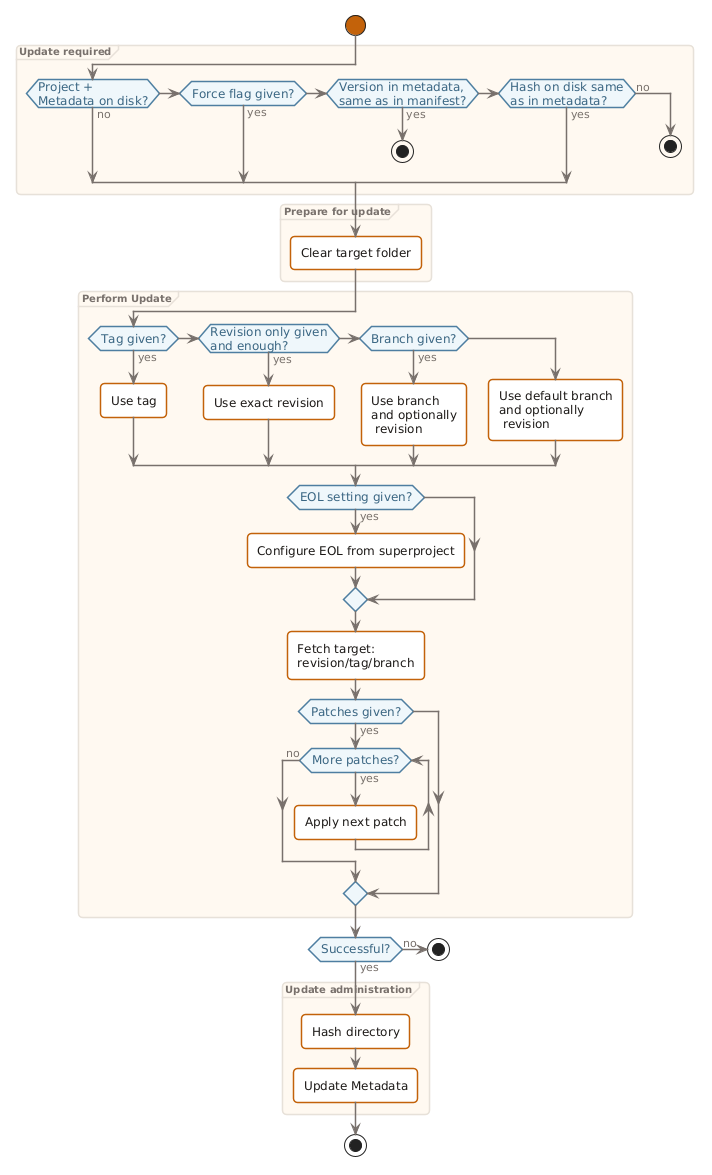
Fetch every project listed in the manifest.
VCS type (Git, SVN, archive) is detected automatically. See Update projects for the full guide.
Example: Git projects are specified in the manifest
Scenario: Git projects are specified in the manifest
    Given the manifest 'dfetch.yaml'
        """
        manifest:
          version: '0.0'

          remotes:
            - name: github-com-dfetch-org
              url-base: https://github.com/dfetch-org/test-repo

          projects:
            - name: ext/test-repo-rev-only
              revision: e1fda19a57b873eb8e6ae37780594cbb77b70f1a
              dst: ext/test-repo-rev-only

            - name: ext/test-rev-and-branch
              revision: 8df389d0524863b85f484f15a91c5f2c40aefda1
              branch: main
              dst: ext/test-rev-and-branch

            - name: ext/test-repo-tag-v1
              tag: v1
              dst: ext/test-repo-tag-v1

        """
    When I run "dfetch update"
    Then the following projects are fetched
        | path                       |
        | ext/test-repo-rev-only     |
        | ext/test-rev-and-branch    |
        | ext/test-repo-tag-v1       |
Example: Tag is updated in manifest
Scenario: Tag is updated in manifest
    Given the manifest 'dfetch.yaml'
        """
        manifest:
          version: '0.0'

          projects:
            - name: ext/test-repo-tag
              url: https://github.com/dfetch-org/test-repo
              tag: v1

        """
    And all projects are updated
    When the manifest 'dfetch.yaml' is changed to
        """
        manifest:
          version: '0.0'

          projects:
            - name: ext/test-repo-tag
              url: https://github.com/dfetch-org/test-repo
              tag: v2.0

        """
    And I run "dfetch update"
    Then the output shows
        """
        Dfetch (0.14.3)
          ext/test-repo-tag:
          > Fetched v2.0
        """
Example: Version check ignored when force flag is given
Scenario: Version check ignored when force flag is given
    Given the manifest 'dfetch.yaml'
        """
        manifest:
          version: '0.0'

          projects:
            - name: ext/test-repo-tag
              url: https://github.com/dfetch-org/test-repo
              tag: v1

        """
    And all projects are updated
    When I run "dfetch update --force"
    Then the output shows
        """
        Dfetch (0.14.3)
          ext/test-repo-tag:
          > Fetched v1
        """
Example: Update with empty manifest does nothing
Scenario: Update with empty manifest does nothing
    Given the manifest 'dfetch.yaml'
        """
        manifest:
          version: '0.0'
        """
    When I run "dfetch update"
    Then the output shows
        """
        Dfetch (0.14.3)
        """
Example: SVN projects are specified in the manifest
Scenario: SVN projects are specified in the manifest
    Given the manifest 'dfetch.yaml'
        """
        manifest:
          version: '0.0'

          remotes:
            - name: cunit
              url-base: https://svn.code.sf.net/p/cunit/code
              default: true

            - name: cutter
              url-base: https://svn.code.sf.net/p/cutter/svn/cutter

          projects:
            - name: cunit-svn-rev-only
              revision: '176'
              vcs: svn
              dst: ext/cunit-svn-rev-only

            - name: cunit-svn-rev-and-branch
              revision: '156'
              vcs: svn
              branch: mingw64
              dst: ext/cunit-svn-rev-and-branch

            - name: cutter-svn-tag
              vcs: svn
              tag: 1.1.7
              src: acmacros
              dst: ext/cutter-svn-tag
              remote: cutter

        """
    When I run "dfetch update"
    Then the following projects are fetched
        | path                         |
        | ext/cunit-svn-rev-only       |
        | ext/cunit-svn-rev-and-branch |
        | ext/cutter-svn-tag           |
Example: Directory in a non-standard SVN repository can be fetched
Scenario: Directory in a non-standard SVN repository can be fetched
    Given the manifest 'dfetch.yaml' in MyProject
        """
        manifest:
            version: 0.0
            projects:
                - name: SomeProject
                  url: some-remote-server/SomeProject
                  src: SomeFolder/
                  branch: ' '
        """
    And a non-standard svn-server "SomeProject" with the files
        | path                                  |
        | SomeFolder/SomeFile.txt               |
        | SomeOtherFolder/SomeOtherFile.txt     |
    When I run "dfetch update"
    Then 'MyProject' looks like:
        """
        MyProject/
            SomeProject/
                .dfetch_data.yaml
                SomeFile.txt
            dfetch.yaml
        """
Example: SVN repository with a tags can be fetched
Scenario: SVN repository with a tags can be fetched
    Given the manifest 'dfetch.yaml' in MyProject
        """
        manifest:
            version: 0.0
            projects:
                - name: SomeProject
                  url: some-remote-server/SomeProject
                  tag: 'v1.2.3'

                - name: SomeOtherProject
                  url: some-remote-server/SomeOtherProject
                  tag: 'v 1&;{6}'
        """
    And a svn-server "SomeProject" with the tag "v1.2.3"
    And a svn-server "SomeOtherProject" with the tag "v 1&;{6}"
    When I run "dfetch update"
    Then 'MyProject' looks like:
        """
        MyProject/
            SomeOtherProject/
                .dfetch_data.yaml
                README.md
            SomeProject/
                .dfetch_data.yaml
                README.md
            dfetch.yaml
        """
Example: Tar.gz archive project is fetched
Scenario: Tar.gz archive project is fetched
    Given an archive "SomeProject.tar.gz" with the files
        | path       |
        | README.md  |
        | src/main.c |
    And the manifest 'dfetch.yaml' in MyProject
        """
        manifest:
          version: '0.0'
          projects:
            - name: SomeProject
              url: some-remote-server/SomeProject.tar.gz
              vcs: archive
        """
    When I run "dfetch update" in MyProject
    Then 'MyProject' looks like:
        """
        MyProject/
            SomeProject/
                .dfetch_data.yaml
                README.md
                src/
                    main.c
            dfetch.yaml
        """
Example: Zip archive project is fetched
Scenario: Zip archive project is fetched
    Given an archive "SomeProject.zip" with the files
        | path          |
        | README.md     |
        | include/lib.h |
    And the manifest 'dfetch.yaml' in MyProject
        """
        manifest:
          version: '0.0'
          projects:
            - name: SomeProject
              url: some-remote-server/SomeProject.zip
              vcs: archive
        """
    When I run "dfetch update" in MyProject
    Then 'MyProject' looks like:
        """
        MyProject/
            SomeProject/
                .dfetch_data.yaml
                README.md
                include/
                    lib.h
            dfetch.yaml
        """
Example: Archive projects with sha256, sha384 and sha512 hash verification are fetched
Scenario: Archive projects with sha256, sha384 and sha512 hash verification are fetched
    Given an archive "SomeProject.tar.gz" with the files
        | path      |
        | README.md |
    And the manifest 'dfetch.yaml' in MyProject
        """
        manifest:
          version: '0.0'
          projects:
            - name: SomeProject-sha256
              url: some-remote-server/SomeProject.tar.gz
              vcs: archive
              integrity:
                hash: sha256:<archive-sha256>
            - name: SomeProject-sha384
              url: some-remote-server/SomeProject.tar.gz
              vcs: archive
              integrity:
                hash: sha384:<archive-sha384>
            - name: SomeProject-sha512
              url: some-remote-server/SomeProject.tar.gz
              vcs: archive
              integrity:
                hash: sha512:<archive-sha512>
        """
    When I run "dfetch update" in MyProject
    Then 'MyProject' looks like:
        """
        MyProject/
            SomeProject-sha256/
                .dfetch_data.yaml
                README.md
            SomeProject-sha384/
                .dfetch_data.yaml
                README.md
            SomeProject-sha512/
                .dfetch_data.yaml
                README.md
            dfetch.yaml
        """
Example: Archive with incorrect sha256 hash is rejected
Scenario: Archive with incorrect sha256 hash is rejected
    Given an archive "SomeProject.tar.gz" with the files
        | path      |
        | README.md |
    And the manifest 'dfetch.yaml' in MyProject
        """
        manifest:
          version: '0.0'
          projects:
            - name: SomeProject
              url: some-remote-server/SomeProject.tar.gz
              vcs: archive
              integrity:
                hash: sha256:0000000000000000000000000000000000000000000000000000000000000000
        """
    When I run "dfetch update" in MyProject
    Then the output shows
        """
        Dfetch (0.14.3)
          SomeProject:
          > Hash mismatch for SomeProject! sha256 expected 0000000000000000000000000000000000000000000000000000000000000000
        """
Example: Specific directory from archive can be fetched
Scenario: Specific directory from archive can be fetched
    Given an archive "SomeProject.tar.gz" with the files
        | path              |
        | src/main.c        |
        | src/lib.c         |
        | tests/test_main.c |
    And the manifest 'dfetch.yaml' in MyProject
        """
        manifest:
          version: '0.0'
          projects:
            - name: SomeProject
              url: some-remote-server/SomeProject.tar.gz
              vcs: archive
              src: src/
        """
    When I run "dfetch update" in MyProject
    Then 'MyProject' looks like:
        """
        MyProject/
            SomeProject/
                .dfetch_data.yaml
                lib.c
                main.c
            dfetch.yaml
        """
Example: Files can be ignored when fetching from archive
Scenario: Files can be ignored when fetching from archive
    Given an archive "SomeProject.tar.gz" with the files
        | path              |
        | README.md         |
        | src/main.c        |
        | tests/test_main.c |
    And the manifest 'dfetch.yaml' in MyProject
        """
        manifest:
          version: '0.0'
          projects:
            - name: SomeProject
              url: some-remote-server/SomeProject.tar.gz
              vcs: archive
              ignore:
                - tests
        """
    When I run "dfetch update" in MyProject
    Then 'MyProject' looks like:
        """
        MyProject/
            SomeProject/
                .dfetch_data.yaml
                README.md
                src/
                    main.c
            dfetch.yaml
        """
Example: Archive is re-fetched when force flag is given
Scenario: Archive is re-fetched when force flag is given
    Given an archive "SomeProject.tar.gz" with the files
        | path      |
        | README.md |
    And the manifest 'dfetch.yaml' in MyProject
        """
        manifest:
          version: '0.0'
          projects:
            - name: SomeProject
              url: some-remote-server/SomeProject.tar.gz
              vcs: archive
        """
    And all projects are updated in MyProject
    When I run "dfetch update --force" in MyProject
    Then the output shows
        """
        Dfetch (0.14.3)
          SomeProject:
          > Fetched some-remote-server/SomeProject.tar.gz
        """
Example: Multiple archive projects are fetched
Scenario: Multiple archive projects are fetched
    Given an archive "LibA.tar.gz" with the files
        | path      |
        | README.md |
    And an archive "LibB.zip" with the files
        | path      |
        | README.md |
    And the manifest 'dfetch.yaml' in MyProject
        """
        manifest:
          version: '0.0'
          projects:
            - name: LibA
              url: some-remote-server/LibA.tar.gz
              vcs: archive

            - name: LibB
              url: some-remote-server/LibB.zip
              vcs: archive
        """
    When I run "dfetch update" in MyProject
    Then the following projects are fetched
        | path           |
        | MyProject/LibA |
        | MyProject/LibB |
Example: Archive with internal relative symlink using .. is fetched safely
Scenario: Archive with internal relative symlink using .. is fetched safely
    Given an archive "SomeProject.tar.gz" with the files
        | path             |
        | README.md        |
        | other/target.mk  |
    And the archive "SomeProject.tar.gz" contains a symlink "sub/dir/link.mk" pointing to "../../other/target.mk"
    And the manifest 'dfetch.yaml' in MyProject
        """
        manifest:
          version: '0.0'
          projects:
            - name: SomeProject
              url: some-remote-server/SomeProject.tar.gz
              vcs: archive
        """
    When I run "dfetch update" in MyProject
    Then 'MyProject' looks like:
        """
        MyProject/
            SomeProject/
                .dfetch_data.yaml
                README.md
                other/
                    target.mk
                sub/
                    dir/
                        link.mk
            dfetch.yaml
        """
    And 'MyProject/SomeProject/sub/dir/link.mk' is a symlink pointing to '../../other/target.mk'
Example: Git projects are specified in the manifest
Scenario: Git projects are specified in the manifest
    Given the manifest 'dfetch.yaml' in MyProject
        """
        manifest:
            version: 0.0
            projects:
                - name: SomeProjectWithManifest
                  dst: third-party/SomeProjectWithManifest
                  url: some-remote-server/SomeProjectWithManifest.git
                  tag: v1
                - name: SomeProjectWithoutManifest
                  dst: third-party/SomeProjectWithoutManifest
                  url: some-remote-server/SomeProjectWithoutManifest.git
                  tag: v1
        """
    And a git-repository "SomeProjectWithManifest.git" with the manifest:
        """
        manifest:
            version: 0.0
            remotes:
                - name: github-com-dfetch-org
                  url-base: https://github.com/dfetch-org/test-repo

            projects:
                - name: SomeOtherProject
                  dst: SomeOtherProject
                  url: some-remote-server/SomeOtherProject.git
                  tag: v1

                - name: ext/test-repo-tag-v1
                  tag: v1
        """
    And a git repository "SomeProjectWithoutManifest.git"
    When I run "dfetch update" in MyProject
    Then the output shows
        """
        Dfetch (0.14.3)
          SomeProjectWithManifest:
          > Fetched v1
          > "SomeProjectWithManifest" depends on the following project(s) which are not part of your manifest:
            (found in third-party/SomeProjectWithManifest/dfetch.yaml)

            -   name: SomeOtherProject
                url: some-remote-server/SomeOtherProject.git
                tag: v1
            -   name: ext/test-repo-tag-v1
                url: https://github.com/dfetch-org/test-repo
                tag: v1

          SomeProjectWithoutManifest:
          > Fetched v1
        """
    And 'MyProject' looks like:
        """
        MyProject/
            dfetch.yaml
            third-party/
                SomeProjectWithManifest/
                    .dfetch_data.yaml
                    README.md
                    dfetch.yaml
                SomeProjectWithoutManifest/
                    .dfetch_data.yaml
                    README.md
        """
Example: A project from a submanifest has an invalid manifest
Scenario: A project from a submanifest has an invalid manifest
    Given the manifest 'dfetch.yaml' in MyProject
        """
        manifest:
            version: 0.0
            projects:
                - name: SomeProject
                  dst: third-party/SomeProject
                  url: some-remote-server/SomeProject.git
                  tag: v1
        """
    And a git-repository "SomeProject.git" with the manifest:
        """
        very-invalid-manifest
        """
    When I run "dfetch update" in MyProject
    Then the output shows
        """
        Dfetch (0.14.3)
          SomeProject:
          > Fetched v1
          > SomeProject/dfetch.yaml: Schema validation failed:
                "very-invalid-manifest\n"
                 ^ (line: 1)
            found arbitrary text
        """
    And 'MyProject' looks like:
        """
        MyProject/
            dfetch.yaml
            third-party/
                SomeProject/
                    .dfetch_data.yaml
                    README.md
                    dfetch.yaml
        """
Example: A project with a git submodule is fetched at the pinned revision
Scenario: A project with a git submodule is fetched at the pinned revision
    Given the manifest 'dfetch.yaml' in MyProject
        """
        manifest:
            version: 0.0
            projects:
                - name: my-project-with-submodules
                  url: some-remote-server/SomeInterestingProject.git
        """
    When I run "dfetch update"
    Then the output shows
        """
        Dfetch (0.14.3)
          my-project-with-submodules:
          > Found & fetched submodule "./ext/test-repo1"  (some-remote-server/TestRepo.git @ master - 79698c99152e4a4b7b759c9def50a130bc91a2ff)
          > Found & fetched submodule "./ext/test-repo2"  (some-remote-server/TestRepo.git @ master - 79698c99152e4a4b7b759c9def50a130bc91a2ff)
          > Fetched master - e1fda19a57b873eb8e6ae37780594cbb77b70f1a
        """
    Then 'MyProject' looks like:
        """
        MyProject/
            dfetch.yaml
            my-project-with-submodules/
                .dfetch_data.yaml
                README.md
                ext/
                    test-repo1/
                        README.md
                    test-repo2/
                        README.md
        """
Example: A project with a git submodule that itself has a nested submodule is fetched at the pinned revision
Scenario: A project with a git submodule that itself has a nested submodule is fetched at the pinned revision
    Given a git repository "LeafProject.git"
    And a git-repository "MiddleProject.git" with the following submodules
        | path     | url                                | revision |
        | ext/leaf | some-remote-server/LeafProject.git | master   |
    And a git-repository "OuterProject.git" with the following submodules
        | path       | url                                  | revision |
        | ext/middle | some-remote-server/MiddleProject.git | master   |
    Given the manifest 'dfetch.yaml' in MyProject
        """
        manifest:
            version: 0.0
            projects:
                - name: outer-project
                  url: some-remote-server/OuterProject.git
        """
    When I run "dfetch update"
    Then the output shows
        """
        Dfetch (0.14.3)
          outer-project:
          > Found & fetched submodule "./ext/middle"  (some-remote-server/MiddleProject.git @ master - 79698c99152e4a4b7b759c9def50a130bc91a2ff)
          > Fetched master - e1fda19a57b873eb8e6ae37780594cbb77b70f1a
        """
    Then 'MyProject' looks like:
        """
        MyProject/
            dfetch.yaml
            outer-project/
                .dfetch_data.yaml
                README.md
                ext/
                    middle/
                        README.md
                        ext/
                            leaf/
                                README.md
        """
Example: Submodule changes are reported in the project report
Scenario: Submodule changes are reported in the project report
    Given a fetched and committed MyProject with the manifest
        """
        manifest:
            version: 0.0
            projects:
                - name: my-project-with-submodules
                  url: some-remote-server/SomeInterestingProject.git
        """
    When I run "dfetch report" in MyProject
    Then the output shows
        """
        Dfetch (0.14.3)
          my-project-with-submodules:
          - remote            : <none>
            remote url        : some-remote-server/SomeInterestingProject.git
            branch            : master
            tag               : <none>
            last fetch        : 26/02/2026, 20:28:24
            revision          : 79698c99152e4a4b7b759c9def50a130bc91a2ff
            patch             : <none>
            licenses          : <none>

            dependencies      :
            - path            : ext/test-repo1
              url             : some-remote-server/TestRepo.git
              branch          : master
              tag             : <none>
              revision        : e1fda19a57b873eb8e6ae37780594cbb77b70f1a
              source-type     : git-submodule

            - path            : ext/test-repo2
              url             : some-remote-server/TestRepo.git
              branch          : master
              tag             : <none>
              revision        : 8df389d0524863b85f484f15a91c5f2c40aefda1
              source-type     : git-submodule
        """
Example: Subfolder is matched through a glob is fetched and submodules are resolved
Scenario: Subfolder is matched through a glob is fetched and submodules are resolved
    Given a git-repository "GlobProject.git" with the following submodules
        | path                     | url                             | revision |
        | some_dir_a/ext/test-repo | some-remote-server/TestRepo.git | master   |
    Given the manifest 'dfetch.yaml' in MyProject
        """
        manifest:
            version: 0.0
            projects:
                - name: glob-project
                  url: some-remote-server/GlobProject.git
                  src: some_dir_*
        """
    When I run "dfetch update"
    Then the output shows
        """
        Dfetch (0.14.3)
          glob-project:
          > Found & fetched submodule "./ext/test-repo"  (some-remote-server/TestRepo.git @ master - 79698c99152e4a4b7b759c9def50a130bc91a2ff)
          > Fetched master - e1fda19a57b873eb8e6ae37780594cbb77b70f1a
        """
    Then 'MyProject' looks like:
        """
        MyProject/
            dfetch.yaml
            glob-project/
                .dfetch_data.yaml
                ext/
                    test-repo/
                        README.md
        """
Example: A submodule within a plain src directory is fetched
Scenario: A submodule within a plain src directory is fetched
    Given a git-repository "PlainSrcProject.git" with the following submodules
        | path                    | url                             | revision |
        | src_folder/ext/sub-repo | some-remote-server/TestRepo.git | master   |
    Given the manifest 'dfetch.yaml' in MyProject
        """
        manifest:
            version: 0.0
            projects:
                - name: plain-src-project
                  url: some-remote-server/PlainSrcProject.git
                  src: src_folder
        """
    When I run "dfetch update"
    Then the output shows
        """
        Dfetch (0.14.3)
          plain-src-project:
          > Found & fetched submodule "./ext/sub-repo"  (some-remote-server/TestRepo.git @ master - 79698c99152e4a4b7b759c9def50a130bc91a2ff)
          > Fetched master - e1fda19a57b873eb8e6ae37780594cbb77b70f1a
        """
    Then 'MyProject' looks like:
        """
        MyProject/
            dfetch.yaml
            plain-src-project/
                .dfetch_data.yaml
                ext/
                    sub-repo/
                        README.md
        """
Example: A submodule outside the src folder is not fetched when src is specified
Scenario: A submodule outside the src folder is not fetched when src is specified
    Given a git-repository "MixedSubmoduleProject.git" with the following submodules
        | path                  | url                             | revision |
        | src_folder/ext/inside | some-remote-server/TestRepo.git | master   |
        | other_ext/outside     | some-remote-server/TestRepo.git | master   |
    Given the manifest 'dfetch.yaml' in MyProject
        """
        manifest:
            version: 0.0
            projects:
                - name: mixed-project
                  url: some-remote-server/MixedSubmoduleProject.git
                  src: src_folder
        """
    When I run "dfetch update"
    Then the output shows
        """
        Dfetch (0.14.3)
          mixed-project:
          > Found & fetched submodule "./ext/inside"  (some-remote-server/TestRepo.git @ master - 79698c99152e4a4b7b759c9def50a130bc91a2ff)
          > Fetched master - e1fda19a57b873eb8e6ae37780594cbb77b70f1a
        """
    Then 'MyProject' looks like:
        """
        MyProject/
            dfetch.yaml
            mixed-project/
                .dfetch_data.yaml
                ext/
                    inside/
                        README.md
        """
Example: A sibling submodule at the same top-level dir as src is not fetched
Scenario: A sibling submodule at the same top-level dir as src is not fetched
    Given a git-repository "SiblingSubmoduleProject.git" with the following submodules
        | path        | url                             | revision |
        | apps/lib    | some-remote-server/TestRepo.git | master   |
        | apps/widget | some-remote-server/TestRepo.git | master   |
    Given the manifest 'dfetch.yaml' in MyProject
        """
        manifest:
            version: 0.0
            projects:
                - name: sibling-project
                  url: some-remote-server/SiblingSubmoduleProject.git
                  src: apps/lib
        """
    When I run "dfetch update"
    Then the output shows
        """
        Dfetch (0.14.3)
          sibling-project:
          > Fetched master - e1fda19a57b873eb8e6ae37780594cbb77b70f1a
        """
    Then 'MyProject' looks like:
        """
        MyProject/
            dfetch.yaml
            sibling-project/
                .dfetch_data.yaml
                README.md
        """
See also
Update projects — covers the update workflow, pinning versions, and force-fetching.
Diff
Generate a diff of a project.
usage: dfetch diff [-h] [-r <oldrev>[:<newrev>]] <project>
Positional Arguments
- <project>
Project to generate diff from. Output is written to <project>.patch in the superproject root.
Named Arguments
- -r, --revs
Revision(s) to generate diff from. Omit to diff from the last fetched revision to the working copy. Supply one revision to use it as the start point. Supply two revisions separated by ‘:’ (e.g. abc123:def456) for an explicit range.
Default:
''
Create a patch of a project. The diff will be a relative patch file of only the project’s directory.
See also
Patch a project — creating, applying, and maintaining patches across upstream version bumps.
Update patch
Update a patch to reflect the last changes.
usage: dfetch update-patch [-h] [<project> ...]
Positional Arguments
- <project>
Specific project(s) to update
The update-patch command regenerates the last patch of one or
more projects based on the current working tree. This is useful
when you have modified a project after applying a patch and want
to record those changes in an updated patch file. If there is no
patch yet, use dfetch diff instead.
Format patch
Format a patch to upstream any changes.
usage: dfetch format-patch [-h] [-o <output_directory>] [<project> ...]
Positional Arguments
- <project>
Specific project(s) to format patches of
Named Arguments
- -o, --output-directory
Directory to write formatted patches to (default: current working directory). The output file is named formatted-<project>.patch.
Default:
'.'
The format-patch command reformats all patches of
the given subprojects to make the patches usable for the
upstream project. The patches are converted to the upstream
vcs system if required and they are made absolute again.
Report
Generate reports containing information about the projects components.
usage: dfetch report [-h] [-o <filename>] [-t {sbom,list}] [<project> ...]
Positional Arguments
- <project>
Specific project(s) to report
Named Arguments
- -o, --outfile
Report filename
Default:
'report.cdx.json'- -t, --type
Possible choices: sbom, list
Type of report to generate.
Default:
list
Report can be stdout, sbom
Dfetch can generate a report on stdout.
The stdout report prints one block per project. Fields are drawn from the
manifest where possible and fall back to the .dfetch_data.yaml metadata
written by Update when the project has been fetched at least once.
Output format
A typical block looks like this:
my-project:
- remote            : <none>
  remote url        : https://github.com/example/my-project
  branch            : main
  tag               : <none>
  last fetch        : 01/01/2025, 12:00:00
  revision          : e1fda19a…
  patch             : <none>
  licenses          : MIT
The fields are:
remote: named Remotes entry from the manifest (
<none>when the URL is given directly viaurl:).remote url: full URL of the upstream repository (derived from
url:or theurl-baseof the Remotes entry).branch / tag / revision: version as recorded at fetch time; see Revision/Branch/Tag.
last fetch: timestamp of the last successful
dfetch update.patch: patch file(s) applied after fetching (
<none>if unused); see Patch.licenses: license(s) auto-detected in the fetched directory.
If a project has never been fetched the metadata file is absent and only
last fetch: never is shown.
Dependencies
When a fetched git project contains submodules, Dfetch records each one as a
dependency inside the project’s .dfetch_data.yaml metadata file. The
stdout report surfaces these under a dependencies block:
my-project:
- remote            : <none>
  ...
  dependencies      :
  - path            : ext/vendor-lib
    url             : https://github.com/example/vendor-lib
    branch          : master
    tag             : <none>
    revision        : 79698c99…
    source-type     : git-submodule
Each dependency entry contains:
path: location of the submodule inside the fetched project.
url: upstream URL of the submodule repository.
branch / tag / revision: version information pinned by the parent.
source-type: origin of the dependency (e.g.
git-submodule).
Example: Submodule changes are reported in the project report
Scenario: Submodule changes are reported in the project report
    Given a fetched and committed MyProject with the manifest
        """
        manifest:
            version: 0.0
            projects:
                - name: my-project-with-submodules
                  url: some-remote-server/SomeInterestingProject.git
        """
    When I run "dfetch report" in MyProject
    Then the output shows
        """
        Dfetch (0.14.3)
          my-project-with-submodules:
          - remote            : <none>
            remote url        : some-remote-server/SomeInterestingProject.git
            branch            : master
            tag               : <none>
            last fetch        : 26/02/2026, 20:28:24
            revision          : 79698c99152e4a4b7b759c9def50a130bc91a2ff
            patch             : <none>
            licenses          : <none>

            dependencies      :
            - path            : ext/test-repo1
              url             : some-remote-server/TestRepo.git
              branch          : master
              tag             : <none>
              revision        : e1fda19a57b873eb8e6ae37780594cbb77b70f1a
              source-type     : git-submodule

            - path            : ext/test-repo2
              url             : some-remote-server/TestRepo.git
              branch          : master
              tag             : <none>
              revision        : 8df389d0524863b85f484f15a91c5f2c40aefda1
              source-type     : git-submodule
        """
See also
Generate an SBOM — generating a Software Bill of Materials with dfetch report.
Freeze
Freeze your projects versions in the manifest as they are on disk.
usage: dfetch freeze [-h] [<project> ...]
Positional Arguments
- <project>
Specific project(s) to freeze (default: all projects in manifest)
Edits the manifest in-place, preserving comments and layout.
When outside a version-controlled super-project a .backup copy is
created first. Optionally pass one or more project names to freeze only
those projects.
Dfetch can freeze the current versions of the projects.
Say you have the following manifest:
manifest:
    version: 0.0

    projects:
     - name: mymodule
       url: http://git.mycompany.local/mycompany/mymodule
As explained in Revision/Branch/Tag when no version is provided the latest
version of the default branch (e.g. trunk, master) of mymodule will
be fetched on a DFetch update.
When your project becomes stable and you want to rely on a specific version
of mymodule you can run dfetch freeze.
DFetch edits the manifest file in-place so that comments, blank lines
and indentation are preserved. Only the version fields that changed are
touched. When the manifest does not live inside a version-controlled
super-project (git or SVN), a .backup copy of the original is written
before any changes are made.
In our above example this would for instance result in:
manifest:
    version: 0.0

    projects:
     - name: mymodule
       url: http://git.mycompany.local/mycompany/mymodule
       tag: v1.0.0
You can also freeze a subset of projects by listing their names:
$ dfetch freeze mymodule
Example: Git projects are frozen
Scenario: Git projects are frozen
    Given the manifest 'dfetch.yaml'
        """
        manifest:
          version: 0.0

          projects:
            - name: ext/test-repo-tag
              url: https://github.com/dfetch-org/test-repo
              branch: main

        """
    And all projects are updated
    When I run "dfetch freeze"
    Then the manifest 'dfetch.yaml' is replaced with
        """
        manifest:
          version: '0.0'

          projects:
          - name: ext/test-repo-tag
            url: https://github.com/dfetch-org/test-repo
            revision: e1fda19a57b873eb8e6ae37780594cbb77b70f1a
            branch: main

        """

@remote-svn
Example: SVN projects are specified in the manifest
Scenario: SVN projects are specified in the manifest
    Given the manifest 'dfetch.yaml'
        """
        manifest:
          version: '0.0'

          projects:
            - name: cunit-svn
              vcs: svn
              url: https://svn.code.sf.net/p/cunit/code

        """
    And all projects are updated
    When I run "dfetch freeze"
    Then the manifest 'dfetch.yaml' is replaced with
        """
        manifest:
          version: '0.0'

          projects:
          - name: cunit-svn
            branch: trunk
            revision: '176'
            vcs: svn
            url: https://svn.code.sf.net/p/cunit/code

        """
Example: Freeze with empty manifest does nothing
Scenario: Freeze with empty manifest does nothing
    Given the manifest 'dfetch.yaml'
        """
        manifest:
          version: '0.0'
        """
    When I run "dfetch freeze"
    Then the output shows
        """
        Dfetch (0.14.3)
        """
    And the manifest 'dfetch.yaml' is replaced with
        """
        manifest:
          version: '0.0'

        """
Example: Single project is frozen while another is skipped
Scenario: Single project is frozen while another is skipped
    Given the manifest 'dfetch.yaml'
        """
        manifest:
          version: '0.0'

          projects:
            - name: ext/test-repo-tag
              url: https://github.com/dfetch-org/test-repo
              branch: main

            - name: ext/test-repo-tag2
              url: https://github.com/dfetch-org/test-repo
              branch: main

        """
    And all projects are updated
    When I run "dfetch freeze ext/test-repo-tag"
    Then the manifest 'dfetch.yaml' is replaced with
        """
        manifest:
          version: '0.0'

          projects:
          - name: ext/test-repo-tag
            url: https://github.com/dfetch-org/test-repo
            revision: e1fda19a57b873eb8e6ae37780594cbb77b70f1a
            branch: main

          - name: ext/test-repo-tag2
            url: https://github.com/dfetch-org/test-repo
            branch: main

        """
For archive projects, dfetch freeze adds the hash under the nested
integrity.hash key (e.g. integrity.hash: sha256:<hex>) to pin the
exact archive content used. This value acts as the version identifier:
DFetch verifies the downloaded archive against it on every subsequent
dfetch update.
Example: Archive project is frozen with its sha256 hash
Scenario: Archive project is frozen with its sha256 hash
    Given an archive "SomeProject.tar.gz" with the files
        | path      |
        | README.md |
    And the manifest 'dfetch.yaml'
        """
        manifest:
          version: '0.0'

          projects:
            - name: SomeProject
              url: some-remote-server/SomeProject.tar.gz
              vcs: archive
        """
    And all projects are updated
    When I run "dfetch freeze"
    Then the manifest 'dfetch.yaml' is replaced with
        """
        manifest:
          version: '0.0'

          projects:
          - name: SomeProject
            url: some-remote-server/SomeProject.tar.gz
            vcs: archive
            integrity:
              hash: sha256:<archive-sha256>

        """
Example: Already frozen archive project is not changed by freeze
Scenario: Already frozen archive project is not changed by freeze
    Given an archive "SomeProject.tar.gz" with the files
        | path      |
        | README.md |
    And the manifest 'dfetch.yaml'
        """
        manifest:
          version: '0.0'
          projects:
            - name: SomeProject
              url: some-remote-server/SomeProject.tar.gz
              vcs: archive
              integrity:
                hash: sha256:<archive-sha256>
        """
    And all projects are updated
    When I run "dfetch freeze"
    Then the manifest 'dfetch.yaml' is replaced with
        """
        manifest:
          version: '0.0'
          projects:
            - name: SomeProject
              url: some-remote-server/SomeProject.tar.gz
              vcs: archive
              integrity:
                hash: sha256:<archive-sha256>

        """
Example: Git projects are frozen in-place preserving layout
Scenario: Git projects are frozen in-place preserving layout
    Given a local git repo "superproject" with the manifest
        """
        manifest:
          version: '0.0'

          projects:
            - name: ext/test-repo-tag
              url: https://github.com/dfetch-org/test-repo
              branch: main

        """
    And all projects are updated in superproject
    When I run "dfetch freeze" in superproject
    Then the manifest 'dfetch.yaml' in superproject is replaced with
        """
        manifest:
          version: '0.0'

          projects:
          - name: ext/test-repo-tag
            url: https://github.com/dfetch-org/test-repo
            revision: e1fda19a57b873eb8e6ae37780594cbb77b70f1a
            branch: main

        """
    And no file 'dfetch.yaml.backup' exists in superproject
Example: Inline comments on fields are preserved after freeze
Scenario: Inline comments on fields are preserved after freeze
    Given a local git repo "superproject3" with the manifest
        """
        manifest:
          version: '0.0'

          projects:
            - name: ext/test-repo-tag
              url: https://github.com/dfetch-org/test-repo  # source mirror
              branch: main  # track the integration branch

        """
    And all projects are updated in superproject3
    When I run "dfetch freeze" in superproject3
    Then the manifest 'dfetch.yaml' in superproject3 is replaced with
        """
        manifest:
          version: '0.0'

          projects:
          - name: ext/test-repo-tag
            url: https://github.com/dfetch-org/test-repo    # source mirror
            revision: e1fda19a57b873eb8e6ae37780594cbb77b70f1a
            branch: main    # track the integration branch

        """
    And no file 'dfetch.yaml.backup' exists in superproject3
Example: Only selected project is frozen in-place
Scenario: Only selected project is frozen in-place
    Given a local git repo "superproject2" with the manifest
        """
        manifest:
          version: '0.0'

          projects:
            - name: ext/test-repo-tag
              url: https://github.com/dfetch-org/test-repo
              branch: main

            - name: ext/test-repo-tag2
              url: https://github.com/dfetch-org/test-repo
              branch: main

        """
    And all projects are updated in superproject2
    When I run "dfetch freeze ext/test-repo-tag" in superproject2
    Then the manifest 'dfetch.yaml' in superproject2 is replaced with
        """
        manifest:
          version: '0.0'

          projects:
          - name: ext/test-repo-tag
            url: https://github.com/dfetch-org/test-repo
            revision: e1fda19a57b873eb8e6ae37780594cbb77b70f1a
            branch: main

          - name: ext/test-repo-tag2
            url: https://github.com/dfetch-org/test-repo
            branch: main

        """
Environment
Get information about the environment dfetch is working in.
usage: dfetch environment [-h]
Generate output that can be used by dfetch developers to investigate issues.
Dfetch can report information about its working environment.
dfetch environment prints:
Platform — operating system name and kernel version.
VCS tool versions — the version of each supported VCS client (Git, SVN) found on
PATH.
Run this command when setting up a new machine to confirm that the required VCS tools are installed and discoverable, or include the output when filing a bug report so that developers can reproduce your environment exactly.
Validate
Validate a manifest.
usage: dfetch validate [-h]
The Manifest is validated against a schema. See manifest for requirements.
Note that each time either update or check is run, the manifest is also validated.
Dfetch can validate a manifest without fetching anything.
dfetch validate parses dfetch.yaml and checks every field against the
manifest schema — project names, URLs, version strings, source paths, and
integrity hashes are all verified. Any structural or type error is reported
immediately with a clear message pointing at the offending field.
This is useful in CI to catch manifest mistakes before a full dfetch update
run, or as a quick sanity-check after hand-editing the file.
Note
Validation also runs automatically at the start of every dfetch update
and dfetch check — a separate dfetch validate step is only needed
when you want to check the manifest without triggering a fetch.
Example: A valid manifest is provided
Scenario: A valid manifest is provided
    Given the manifest 'dfetch.yaml'
        """
        manifest:
          version: '0.0'

          remotes:
            - name: github-com-dfetch-org
              url-base: https://github.com/dfetch-org/test-repo

          projects:
            - name: ext/test-repo-rev-only
              revision: e1fda19a57b873eb8e6ae37780594cbb77b70f1a

        """
    When I run "dfetch validate"
    Then the output shows
        """
        Dfetch (0.14.3)
          dfetch.yaml         : valid
        """
Example: An empty manifest with no projects is valid
Scenario: An empty manifest with no projects is valid
    Given the manifest 'dfetch.yaml'
        """
        manifest:
          version: '0.0'
        """
    When I run "dfetch validate"
    Then the output shows
        """
        Dfetch (0.14.3)
          dfetch.yaml         : valid
        """
Example: An invalid manifest is provided
Scenario: An invalid manifest is provided
    Given the manifest 'dfetch.yaml'
        """
        manifest-wrong:
          version: '0.0'

          remotes:
            - name: github-com-dfetch-org
              url-base: https://github.com/dfetch-org/test-repo

          projects:
            - name: ext/test-repo-rev-only
              revision: e1fda19a57b873eb8e6ae37780594cbb77b70f1a

        """
    When I run "dfetch validate"
    Then the output shows
        """
        Dfetch (0.14.3)
        Schema validation failed:

            manifest-wrong:
             ^ (line: 1)

        unexpected key not in schema 'manifest-wrong'
        """
Example: A valid archive manifest with integrity hashes is validated
Scenario: A valid archive manifest with integrity hashes is validated
    Given the manifest 'dfetch.yaml'
        """
        manifest:
          version: '0.0'

          projects:
            - name: SomeLib-sha256
              url: https://example.com/SomeLib-1.0.tar.gz
              vcs: archive
              integrity:
                hash: sha256:e3b0c44298fc1c149afbf4c8996fb92427ae41e4649b934ca495991b7852b855

            - name: SomeLib-sha384
              url: https://example.com/SomeLib-2.0.tar.gz
              vcs: archive
              integrity:
                hash: sha384:38b060a751ac96384cd9327eb1b1e36a21fdb71114be07434c0cc7bf63f6e1da274edebfe76f65fbd51ad2f14898b95b

            - name: SomeLib-sha512
              url: https://example.com/SomeLib-3.0.tar.gz
              vcs: archive
              integrity:
                hash: sha512:cf83e1357eefb8bdf1542850d66d8007d620e4050b5715dc83f4a921d36ce9ce47d0d13c5d85f2b0ff8318d2877eec2f63b931bd47417a81a538327af927da3e

        """
    When I run "dfetch validate"
    Then the output shows
        """
        Dfetch (0.14.3)
          dfetch.yaml         : valid
        """
Example: A manifest with an invalid integrity hash format is rejected
Scenario: A manifest with an invalid integrity hash format is rejected
    Given the manifest 'dfetch.yaml'
        """
        manifest:
          version: '0.0'

          projects:
            - name: SomeLib
              url: https://example.com/SomeLib-1.0.tar.gz
              vcs: archive
              integrity:
                hash: not-a-valid-hash

        """
    When I run "dfetch validate"
    Then the output shows
        """
        Dfetch (0.14.3)
        Schema validation failed:
                  hash: not-a-valid-hash
            ^ (line: 9)
        found non-matching string
        """
Example: A manifest with duplicate project names
Scenario: A manifest with duplicate project names
    Given the manifest 'dfetch.yaml'
        """
        manifest:
          version: '0.0'
          remotes:
            - name: github-com-dfetch-org
              url-base: https://github.com/dfetch-org/test-repo
          projects:
            - name: ext/test-repo-rev-only
            - name: ext/test-repo-rev-only
        """
    When I run "dfetch validate"
    Then the output shows
        """
        Dfetch (0.14.3)
        Schema validation failed:
        Duplicate manifest.projects.name value(s): ext/test-repo-rev-only
        """